
Sign-in
Every request except discovery, health, sign-in and the OpenAPI document carries
Authorization: Bearer <access token> (§4.2). A client gets the token from
POST /warp/v1/auth/token (§4.1), or, where a person signs in with the server’s
identity provider, from a browser sign-in flow (§4.3). Discovery says which a server
offers: auth.grant_types for the token endpoint, and capability oauth_browser for the flow.
The token is opaque to clients. Credentials always travel in a JSON body or a header, never in a URL, and never in a cookie: a server reads no cookies at all, which is why the protocol is immune to cross-site request forgery.
Password
Section titled “Password”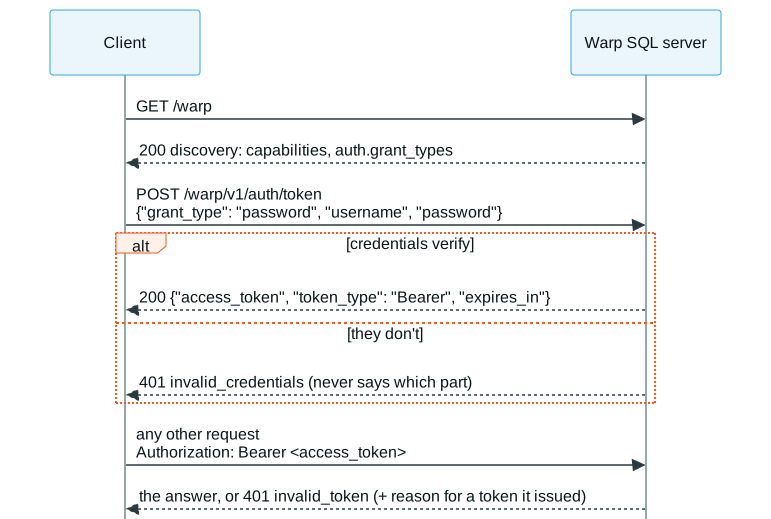
Because the user name and the password are separate JSON fields, a password may contain any
character, : included:
WARP=http://127.0.0.1:31337curl -s $WARP/warp/v1/auth/token -H 'Content-Type: application/json' \ -d '{"grant_type": "password", "username": "joe", "password": "s3:cret"}' \ | jq '{token_type, expires_in, access_token: (.access_token[0:8] + "…")}'{ "token_type": "Bearer", "expires_in": 3600, "access_token": "…"}A wrong user name or password gets 401 invalid_credentials, and the error never says which
of the two was wrong:
curl -s $WARP/warp/v1/auth/token -H 'Content-Type: application/json' \ -d '{"grant_type": "password", "username": "joe", "password": "guess"}' | jq '{status, code, detail}'{ "status": 401, "code": "invalid_credentials", "detail": "the user name or password is not correct"}A missing, malformed, expired or forged token gets 401 invalid_token with
WWW-Authenticate: Bearer. For a token the server issued itself and can verify, the problem
document’s reason says why it stopped working (token_expired, token_revoked,
credentials_changed, principal_dropped), so a client knows whether signing in again can help:
curl -s -i $WARP/warp/v1/sessions -H 'Authorization: Bearer forged' \ -H 'Content-Type: application/json' -d '{}' | tr -d '\r' | grep -E '^(HTTP|WWW-Authenticate|\{)'HTTP/1.1 401 UnauthorizedWWW-Authenticate: Bearer{"type":"urn:warp-sql:error:invalid_token","title":"Invalid access token","status":401,"code":"invalid_token",…}Token exchange
Section titled “Token exchange”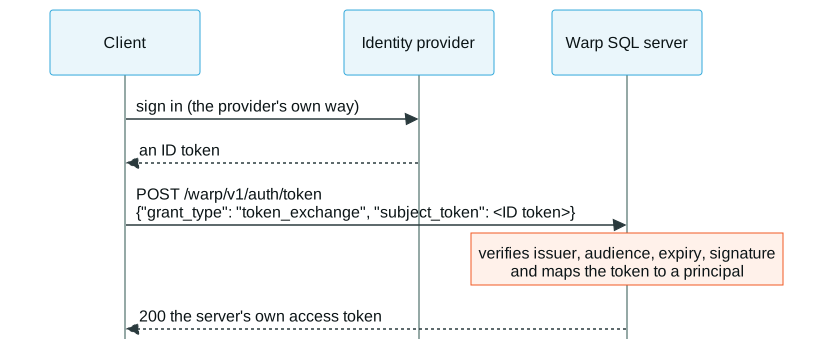
A client that already holds a token from an identity provider the server trusts (an OpenID
Connect ID token, say) exchanges it for the server’s own access token. The server validates
it and maps it to a principal. warp-duckdb doesn’t offer this grant; this runs against
Hardcharger, configured to trust a stand-in identity provider whose ID token is in $ID_TOKEN:
WARP=http://127.0.0.1:31337curl -s $WARP/warp | jq -c .authcurl -s $WARP/warp/v1/auth/token -H 'Content-Type: application/json' \ -d "{\"grant_type\": \"token_exchange\", \"subject_token\": \"$ID_TOKEN\"}" \ | jq -c '{token_type, expires_in}'{"grant_types":["password","token_exchange"]}{"token_type":"Bearer","expires_in":…}A server that verifies TLS client certificates can also offer the client_certificate grant
(capability mtls_identity, §4.4): the request has no credential fields, the
connection’s verified certificate is the credential, and the token it gets is bound to that
certificate.
Browser sign-in
Section titled “Browser sign-in”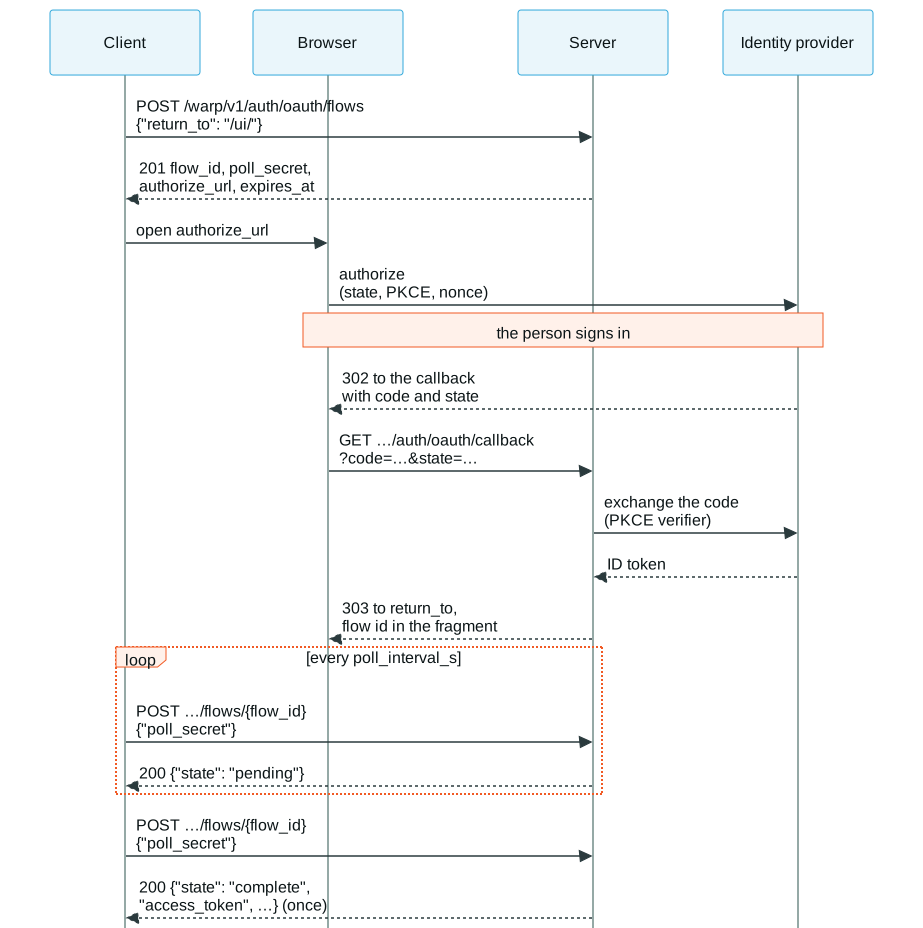
For a person signing in with the server’s identity provider (capability oauth_browser). The
client needs no redirect handling of its own, so command-line tools, desktop drivers and web
pages all use the same three steps: create a flow, let the person sign in in a browser, poll
the flow. The server is the identity provider’s client; its client id and secret never reach
the client.
This runs against warp-duckdb with a stand-in provider that approves every sign-in at once.
Discovery names the provider for the sign-in button:
WARP=http://127.0.0.1:31337curl -s $WARP/warp | jq -c '.auth'{"grant_types":["password"],"oauth_browser":{"provider":"Example IdP"}}1. Create the flow. A web page passes return_to, a path on the server’s own origin to
come back to; a command-line client leaves it out. The poll secret is in this answer and
nowhere else (not in authorize_url, the callback, any redirect, or the server’s logs), so
whoever sees the URL or the flow id can’t collect the token:
curl -s $WARP/warp/v1/auth/oauth/flows -H 'Content-Type: application/json' \ -d '{"return_to": "/ui/"}' > flow.jsonFLOW=$(jq -r .flow_id flow.json)SECRET=$(jq -r .poll_secret flow.json)jq '{flow_id, poll_interval_s, expires_at}' flow.json{ "flow_id": "f_…", "poll_interval_s": 2, "expires_at": "…Z"}Until the person has signed in, a poll says pending. The poll secret travels in the body:
curl -s $WARP/warp/v1/auth/oauth/flows/$FLOW -H 'Content-Type: application/json' \ -d "{\"poll_secret\": \"$SECRET\"}"{"state":"pending"}2. The person signs in. The client opens authorize_url in a browser. The identity provider
sends the browser to the server’s callback, and the callback sends it on to return_to with
the flow id in the URL’s fragment, which browsers never send to a server. Here curl plays the
browser for both hops:
CALLBACK=$(curl -s -o /dev/null -w '%{redirect_url}' "$(jq -r .authorize_url flow.json)")curl -s -D - -o /dev/null "$CALLBACK" | tr -d '\r' | grep -E '^(HTTP|Location)'HTTP/1.1 303 See OtherLocation: /ui/#warp_oauth_flow=f_…A page reads the flow id from the fragment, removes it from the address bar, and polls with the poll secret it kept. A page that has no poll secret for that flow didn’t start it, and ignores it.
3. Collect the token. The completed flow hands out the server’s own access token, exactly
once; after that (or after expires_at, or with a wrong poll secret) the flow is
404 flow_not_found:
curl -s $WARP/warp/v1/auth/oauth/flows/$FLOW -H 'Content-Type: application/json' \ -d "{\"poll_secret\": \"$SECRET\"}" | jq -c '{state, token_type, expires_in}'curl -s $WARP/warp/v1/auth/oauth/flows/$FLOW -H 'Content-Type: application/json' \ -d "{\"poll_secret\": \"$SECRET\"}" | jq -c '{status, code}'{"state":"complete","token_type":"Bearer","expires_in":3600}{"status":404,"code":"flow_not_found"}A failed sign-in polls as {"state": "failed", "error": {"code", "detail"}}, with code
access_denied, invalid_credentials or identity_provider_error, also once.
 Warp SQL is an open protocol, Apache 2.0 licensed. It is maintained by GizmoData.