
Submit, long-poll, fetch
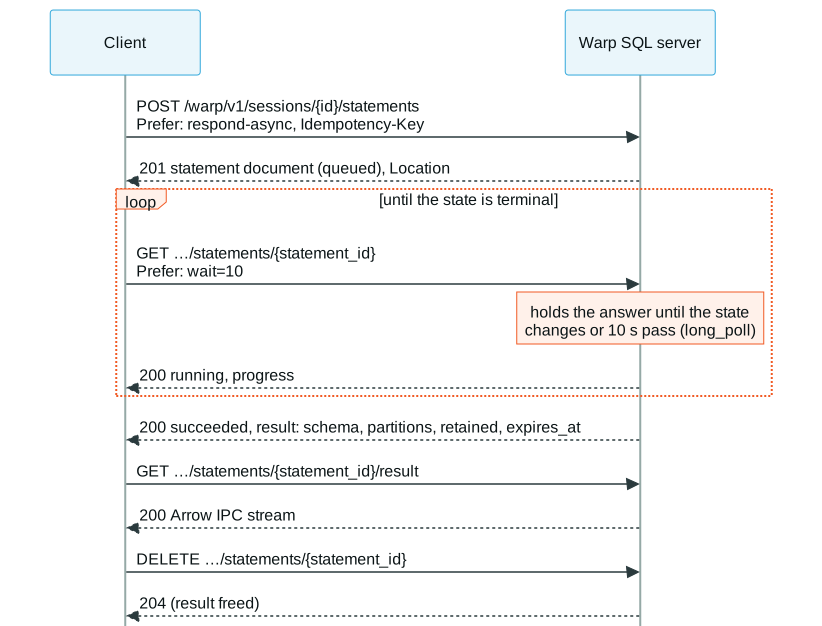
A long query should not depend on one HTTP request staying open: proxies, load balancers and mobile networks cut long requests. On the status-document path the client submits the statement, gets a handle at once, polls it, and fetches the result when it is ready. No request has to outlive a proxy’s timeout (§6.1, §6.3, §6.4).
WARP=http://127.0.0.1:31337TOKEN=$(curl -s $WARP/warp/v1/auth/token -H 'Content-Type: application/json' \ -d '{"grant_type": "password", "username": "joe", "password": "s3:cret"}' | jq -r .access_token)AUTH="Authorization: Bearer $TOKEN"SESSION=$(curl -s $WARP/warp/v1/sessions -H "$AUTH" -H 'Content-Type: application/json' -d '{}' | jq -r .session_id)Submit
Section titled “Submit”Without Accept: application/vnd.apache.arrow.stream, or with Prefer: respond-async, the
answer is 201 with the statement document and a Location. respond-async asks for the
answer as soon as the statement is accepted; Prefer: wait=N would let the server hold it up
to N seconds for the statement to finish:
curl -s -i $WARP/warp/v1/sessions/$SESSION/statements -H "$AUTH" -H 'Content-Type: application/json' \ -H 'Prefer: respond-async' -H "Idempotency-Key: $(uuidgen 2>/dev/null || date +%s%N)" \ -d '{"sql": "SELECT sum(i) AS total FROM range(2000000000) t(i)"}' | tr -d '\r' > submit.txtgrep -E '^(HTTP|Location)' submit.txtSTATEMENT=$(tail -1 submit.txt | jq -r .statement_id)tail -1 submit.txt | jq -c '{state, result}'HTTP/1.1 201 CreatedLocation: /warp/v1/sessions/s_…/statements/q_…{"state":"queued","result":null}Idempotency-Key makes the submit safe to retry when its answer is lost: the server runs a
request with the same key from the same principal once, and answers a repeat with the
existing statement (§6.7). That holds for DML too.
Long-poll
Section titled “Long-poll”With capability long_poll, Prefer: wait=N on the status request holds the answer until the
state changes or N seconds pass. A client asks again until the state is terminal (succeeded,
failed or cancelled); a finished statement is answered at once:
until [ "$(curl -s $WARP/warp/v1/sessions/$SESSION/statements/$STATEMENT -H "$AUTH" \ -H 'Prefer: wait=10' | tee status.json | jq -r .state)" = succeeded ]; do :; donejq '{state, result: (.result | {kind, partitions, retained, expires_at})}' status.json{ "state": "succeeded", "result": { "kind": "rows", "partitions": [ { "index": 0, "location": null, "batches": 1, "rows": 1 } ], "retained": true, "expires_at": "…Z" }}The document’s result.schema is the result’s Arrow schema (base64), known while the statement
still runs. A real client also stops on failed and cancelled, where error holds the
problem document, and treats a state it doesn’t know as not terminal (§12).
The result is an Arrow stream of the partition’s batches. A client may also ask for it while the statement still runs: the server streams batches as they are produced.
curl -s $WARP/warp/v1/sessions/$SESSION/statements/$STATEMENT/result -H "$AUTH" -o total.arrowspython3 -c "import pyarrow.ipc as ipc; print(ipc.open_stream('total.arrows').read_all().to_pylist())"[{'total': Decimal('1999999999000000000')}]The server kept this result because the submit was asynchronous: it can be read again, and
resumed from any batch, until expires_at (Retention and resumption).
A client that is done with a statement deletes it, which frees its result at once; a server forgets finished statements on its own only later (§6.5):
curl -s -o /dev/null -w '%{http_code}\n' -X DELETE $WARP/warp/v1/sessions/$SESSION/statements/$STATEMENT -H "$AUTH"curl -s $WARP/warp/v1/sessions/$SESSION/statements/$STATEMENT -H "$AUTH" | jq -c '{status, code}'204{"status":404,"code":"statement_not_found"} Warp SQL is an open protocol, Apache 2.0 licensed. It is maintained by GizmoData.