
Sessions and transactions
A session is the server-side state of one client connection: current catalog and schema,
settings, temporary objects, an open transaction (§5). Every statement runs in a
session, and a session belongs to the principal that opened it for its whole life. Another
principal naming it gets 404 session_not_found, exactly as if it didn’t exist, so ids can’t
be probed (§9.2).
Lifecycle
Section titled “Lifecycle”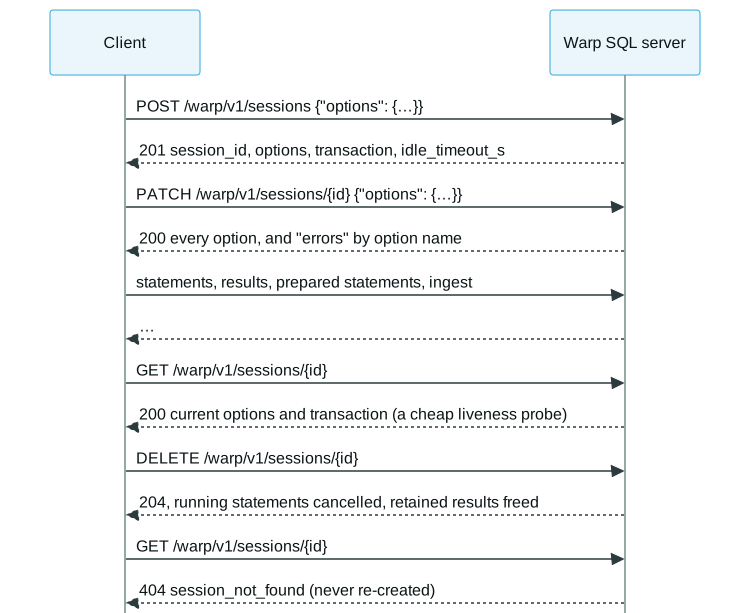
These commands sign in first:
WARP=http://127.0.0.1:31337TOKEN=$(curl -s $WARP/warp/v1/auth/token -H 'Content-Type: application/json' \ -d '{"grant_type": "password", "username": "joe", "password": "s3:cret"}' | jq -r .access_token)AUTH="Authorization: Bearer $TOKEN"Open a session. options is optional; an option the server doesn’t have, or a bad value,
fails the whole request and creates nothing. The answer lists every option the session has,
not only the ones the request set:
curl -s $WARP/warp/v1/sessions -H "$AUTH" -H 'Content-Type: application/json' \ -d '{"options": {"schema": "main"}}' > session.jsonSESSION=$(jq -r .session_id session.json)jq . session.json{ "session_id": "s_…", "options": { "catalog": "memory", "schema": "main", "autocommit": true, "duckdb_arrow_lossless_conversion": false }, "transaction": "none", "idle_timeout_s": 900}duckdb_arrow_lossless_conversion is a server’s own option: names a server adds carry its
prefix (§2.7), and a client ignores the ones it doesn’t know.
Change options with PATCH. Each option is applied on its own, so one bad option doesn’t
stop the others; the failures come back by name, each with a code and detail:
curl -s -X PATCH $WARP/warp/v1/sessions/$SESSION -H "$AUTH" -H 'Content-Type: application/json' \ -d '{"options": {"schema": "main", "catalog": "nope"}}' | jq '.errors'{ "catalog": { "code": "invalid_option_value", "detail": "…" }}Read it any time. A change made through SQL (USE, BEGIN) shows here once its
statement has ended, and the request doesn’t wait for a statement the session is running, so
it is also a cheap liveness probe:
curl -s $WARP/warp/v1/sessions/$SESSION -H "$AUTH" | jq -c '{transaction, idle_timeout_s}'{"transaction":"none","idle_timeout_s":900}A session with no request and nothing running for idle_timeout_s may be evicted. A running
statement, or a retained result not yet expired, keeps it alive.
Transactions
Section titled “Transactions”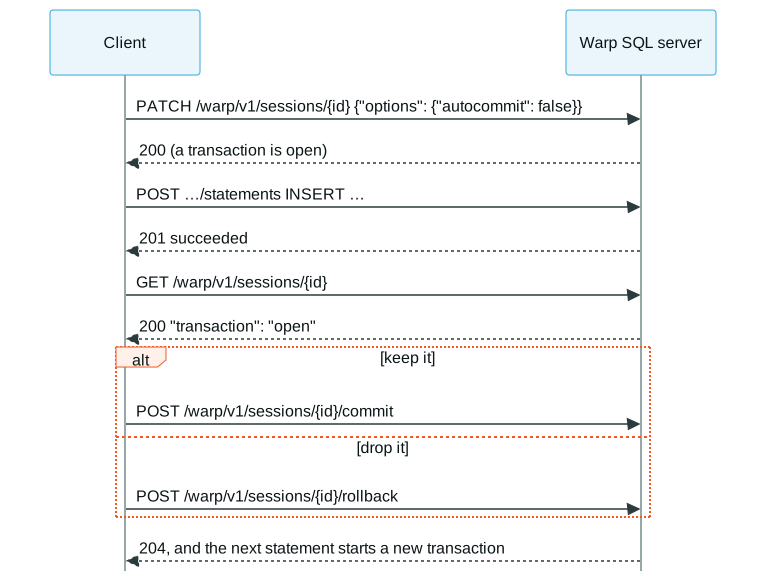
With capability transactions, setting autocommit to false opens a transaction that
POST …/commit or POST …/rollback ends; the next statement starts the next one. SQL BEGIN,
COMMIT and ROLLBACK work too, as the engine allows (§5.5). Clients should read
the session’s transaction (none, open or aborted) rather than track it themselves:
curl -s -X PATCH $WARP/warp/v1/sessions/$SESSION -H "$AUTH" -H 'Content-Type: application/json' \ -d '{"options": {"autocommit": false}}' | jq -c '.errors'curl -s $WARP/warp/v1/sessions/$SESSION/statements -H "$AUTH" -H 'Content-Type: application/json' \ -d '{"sql": "CREATE TABLE notes (id INTEGER, body VARCHAR)"}' | jq -c '{state, result}'curl -s $WARP/warp/v1/sessions/$SESSION -H "$AUTH" | jq -c '{transaction}'curl -s -o /dev/null -w '%{http_code}\n' -X POST $WARP/warp/v1/sessions/$SESSION/commit -H "$AUTH"{}{"state":"succeeded","result":{"kind":"update"}}{"transaction":"open"}204aborted means a statement failed inside the transaction and the engine refuses every
statement until a rollback.
DELETE ends the session, cancels what it runs and frees its retained results. A server never
creates a session again for an id it doesn’t have: the client’s state (settings, temporary
tables, an open transaction) is gone, and only the client can decide to start over:
curl -s -o /dev/null -w '%{http_code}\n' -X DELETE $WARP/warp/v1/sessions/$SESSION -H "$AUTH"curl -s $WARP/warp/v1/sessions/$SESSION -H "$AUTH" | jq -c '{status, code}'204{"status":404,"code":"session_not_found"}A session the server ended for a reason the client must know (an administrator killed it,
the principal’s credentials changed, it was dropped, the token was revoked or expired) answers
401 session_ended with that reason instead (§5.6). A server that knows the
session lives on another instance of its cluster answers 421 session_elsewhere, so a router
can retry the right one.
 Warp SQL is an open protocol, Apache 2.0 licensed. It is maintained by GizmoData.